
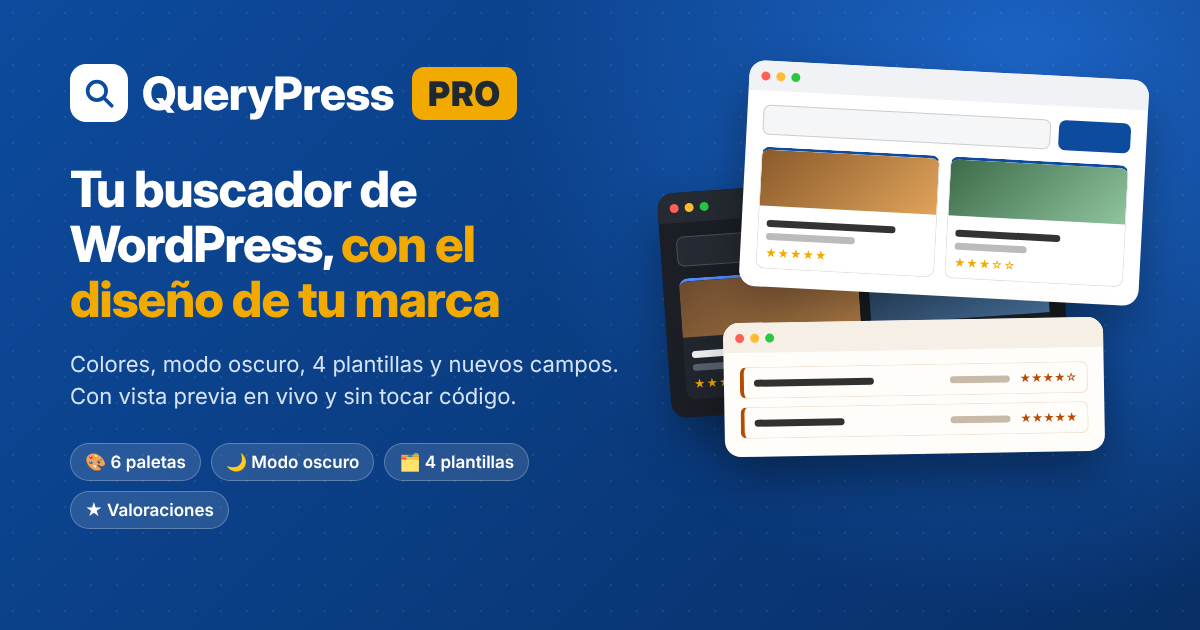
Make your search look like your brand, without touching code
QueryPress Pro adds your own colors, ready-made palettes, dark mode, four result layouts, featured records, a menu to sort results, contact buttons, record pages ready for Google, Excel import and new field types to your search. You choose everything from one screen with a live preview.
14-day money-back guarantee.
Important: QueryPress Pro doesn’t work on its own. It is an add-on and needs the free QueryPress plugin installed and activated. If you install only Pro, you won’t have a search or a design to customize.
Don’t have the free plugin yet? Download it first: it’s free and installs in a couple of minutes.
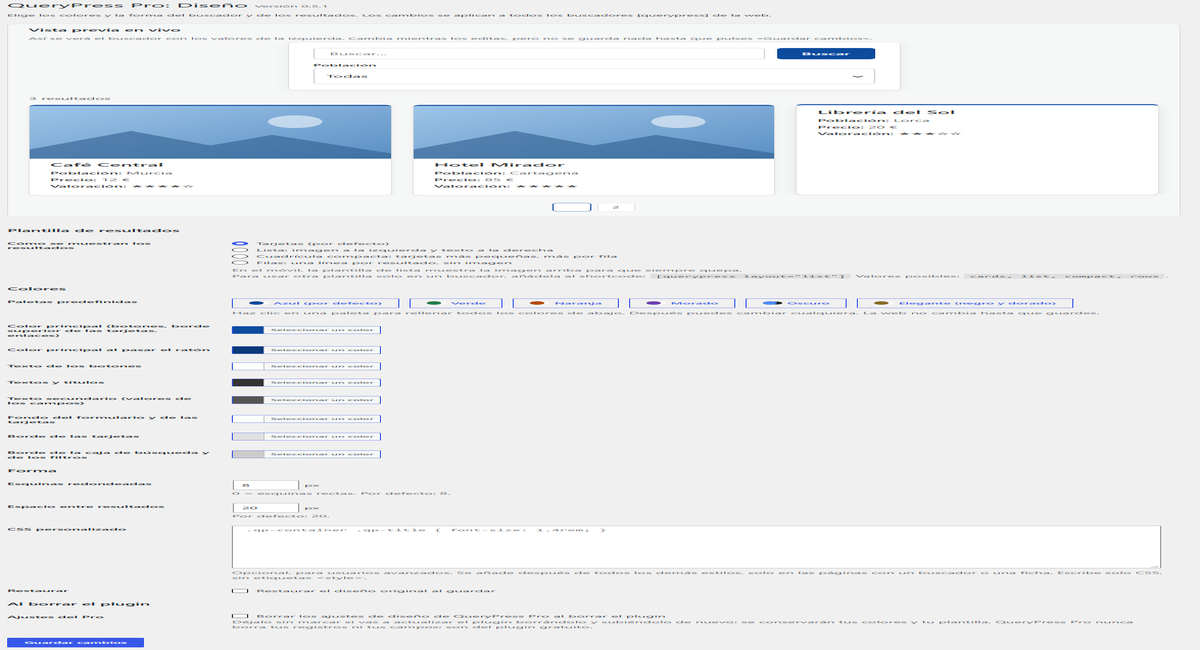
Screenshots are taken from a WordPress site in Spanish. QueryPress and QueryPress Pro are shown in English when your WordPress is in English.
What QueryPress Pro adds
The free plugin already searches fast and filters well. Pro gives it your brand’s look and adds what gets you found and contacted: record pages ready for Google, featured records, sorting and buttons to call or message.
Your colors, live
Main color, buttons, text, backgrounds and borders, seeing the result as you choose and changing nothing until you save.
Palettes in one click
Blue, Green, Orange, Purple, Dark and Elegant. Pick one and every color is filled in.
Dark mode
Search, boxes, dropdowns and cards in dark tones, with all text easy to read.
4 result layouts
Cards, list with the image on the left, compact grid or rows. And a different one for each search with [querypress layout="list"].
Sort results
A “Sort by” menu: price low to high, top rated, name or newest.
5 new field types
Phone, Email, Website, Yes / No and star Rating ★★★★☆.
Featured records
Mark the ones that matter most and they appear first, with their own label and your highlight color.
Contact buttons
Call, WhatsApp, Email, Website and Directions on every record page and on the cards. Phone, email and website are also clickable in the details.
Import and export
Upload hundreds of records from Excel or Google Sheets, with categories and photos, and export everything in one click.
Corners, spacing and CSS
Rounder or squarer cards, the spacing between results you like, and your own CSS if you need it.
Record pages ready for Google
Structured data for local business, product or place, plus an automatic description. Works with Rank Math and Yoast.
Updates and support
Automatic updates from your dashboard and email support for as long as your license is active.
The same directory, three different styles
These are the same businesses with the same search. Only the palette chosen in QueryPress Pro has changed.
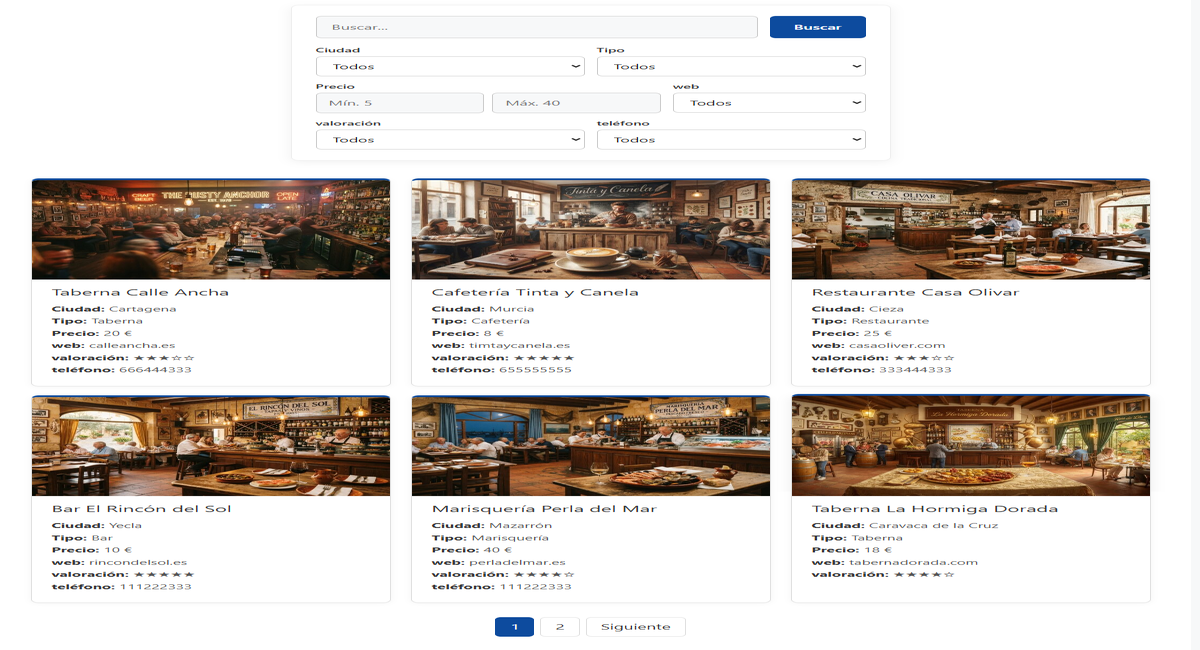
Classic and professional
The style that fits almost any website: clean, clear and easy to read. Ideal for directories, guides and catalogs.
- Search boxes keep your theme’s style.
- Star ratings and websites shown in a short format.
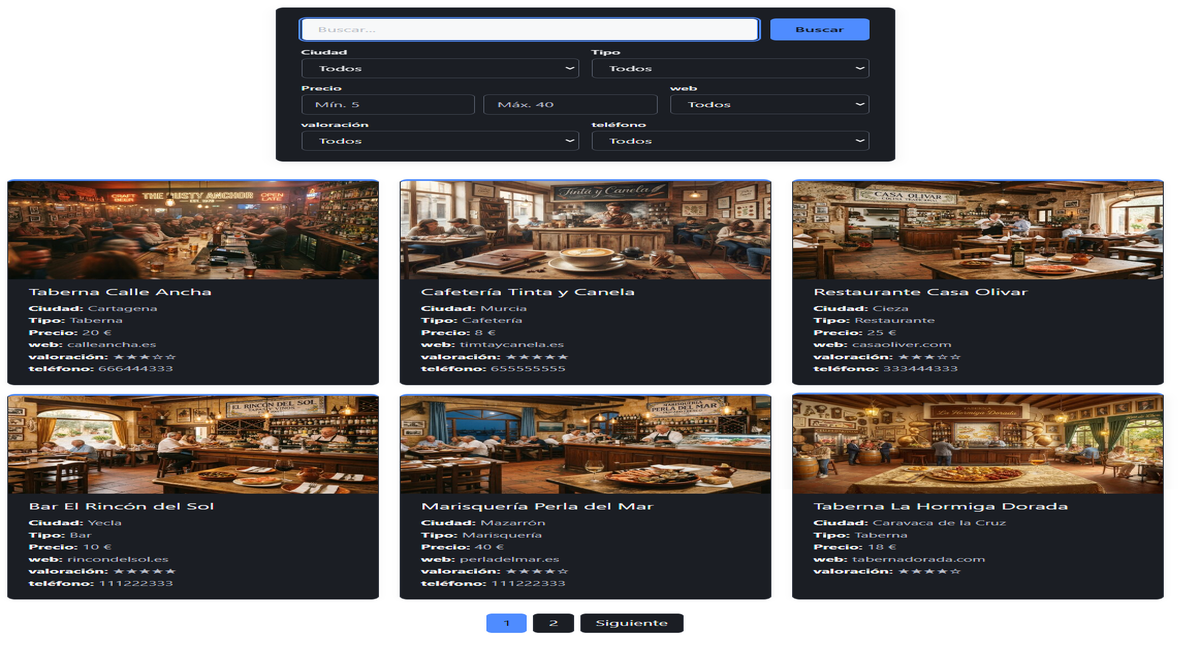
Elegant, with personality
Perfect for leisure, hospitality, music or any site that wants to stand out. Photos look better on a dark background.
- Boxes and dropdowns in dark mode too.
- The results counter and pagination stay readable.
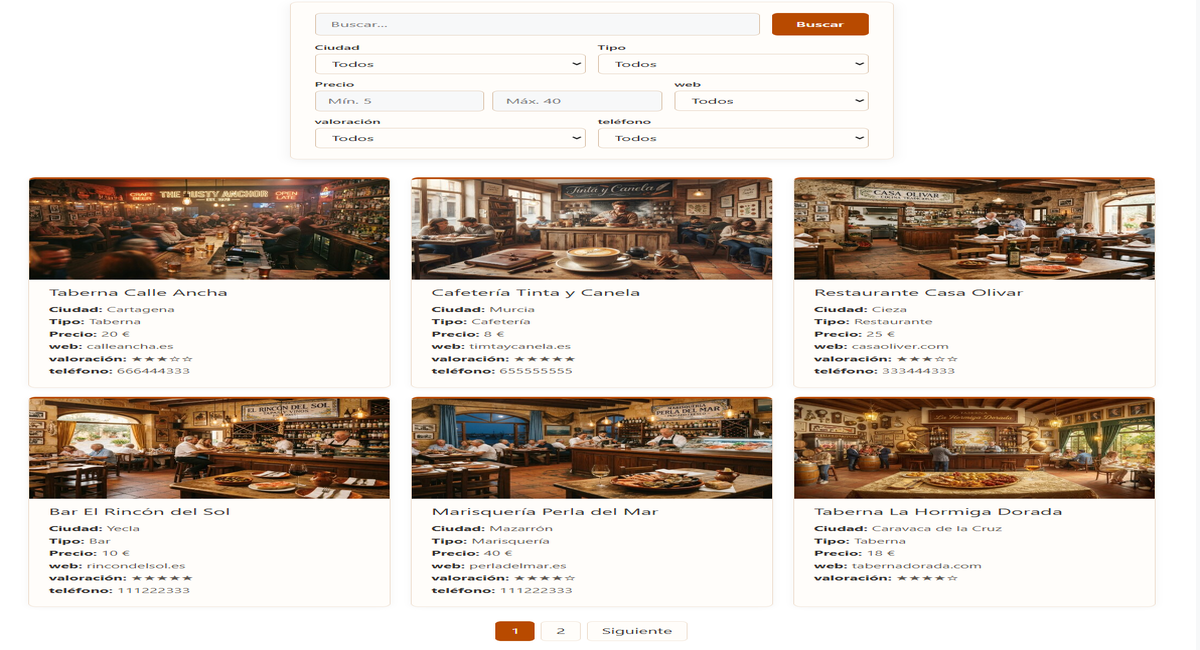
Warm and friendly
Inviting tones, great for restaurants, tourism, food or local shops.
- Colors checked so button text is easy to read.
- You can tweak any color after choosing the palette.
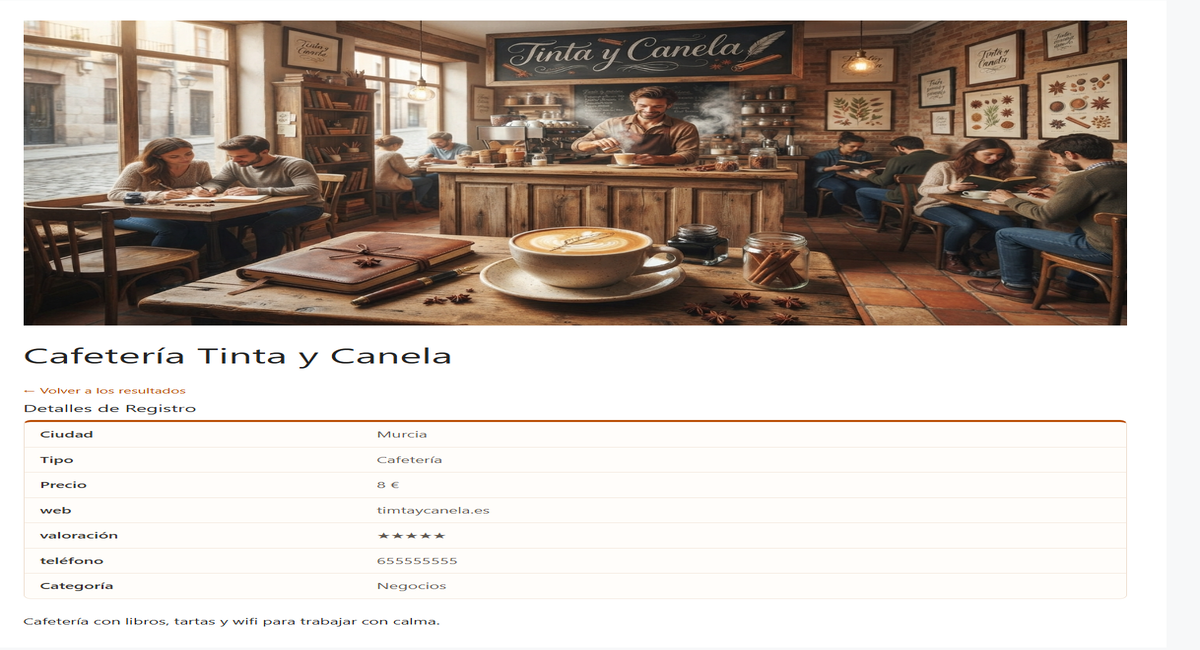
The design reaches every record page
The page of each business, product or property uses the same colors and corners as the search, so your whole site looks consistent.
- Pro field types are shown on the record page too.
- “Back to results” button in your main color.
Highlight the records that matter most
A sponsored business, a special offer, your star product… Mark it as featured and it appears first in the results, with its own label and a colored border nobody can miss.

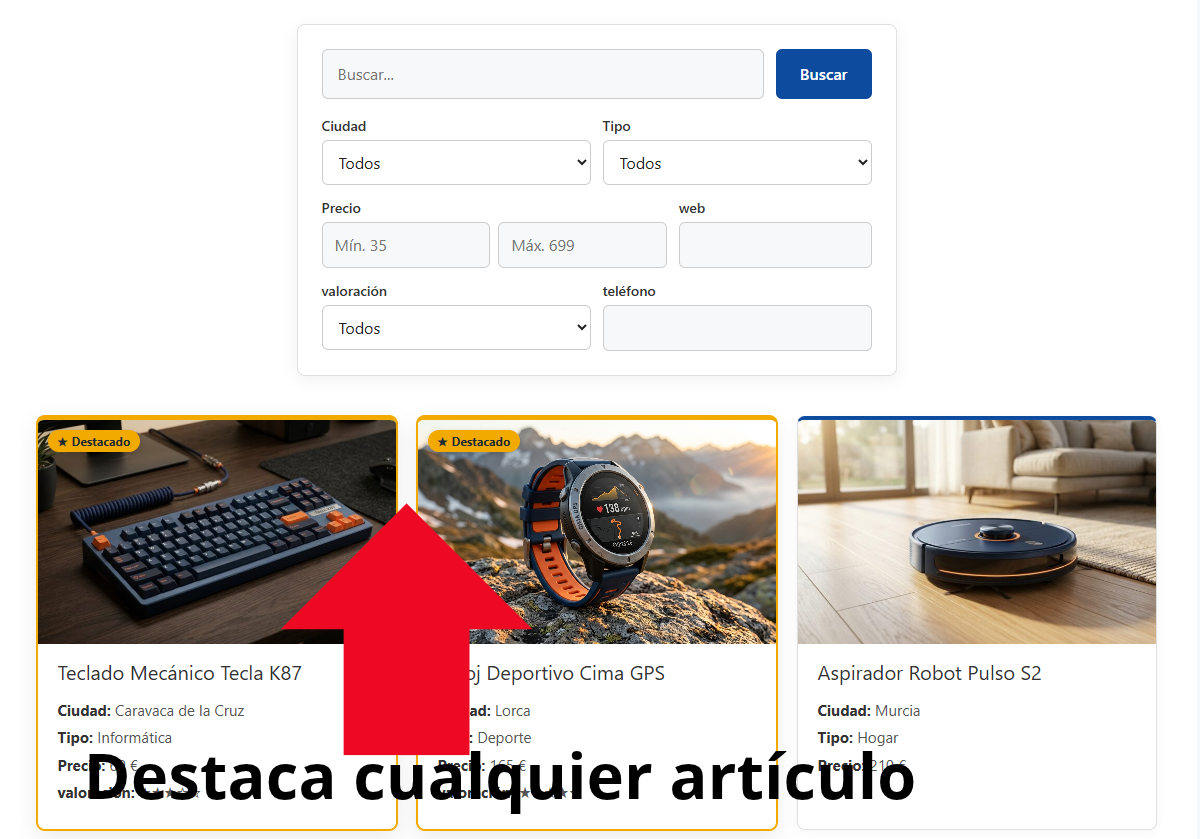
- Feature as many records as you like: among themselves they are sorted from newest to oldest.
- If you only want them highlighted, without changing the order, untick “Show featured records first”.
- Works with all four result layouts and any palette, including dark mode.
Let visitors sort the results their way
Cheapest to most expensive, top rated first, by name or newest. A “Sort by” menu that works instantly, together with search and filters.
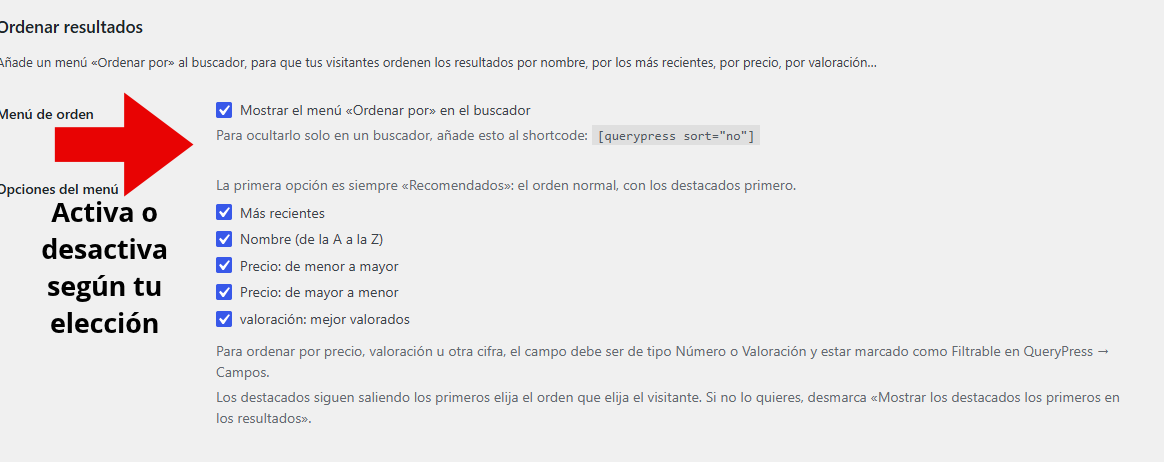
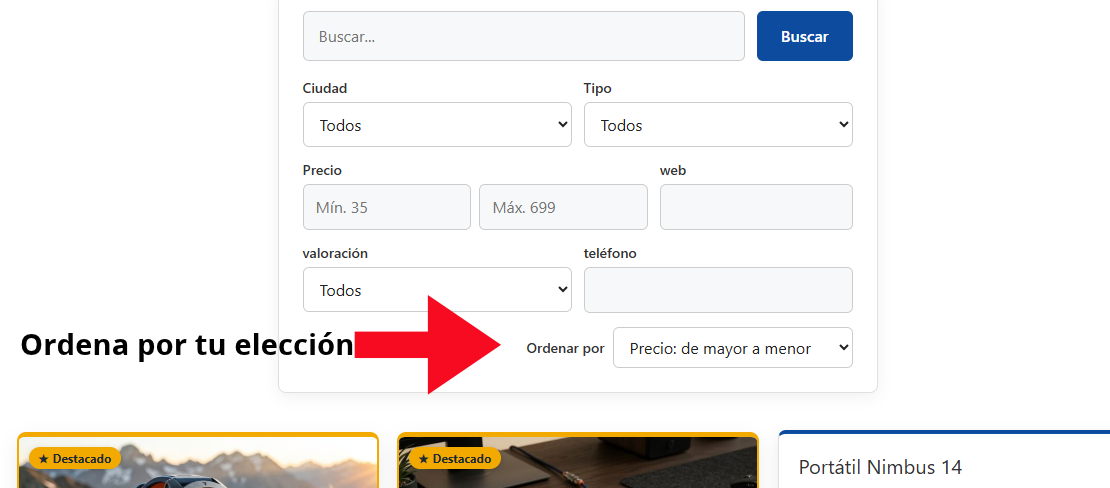
- Sort by any Number field (price, size, years…) or Rating field, as well as by name and date.
- Works with live search, filters, pagination and the browser’s Back button.
- Featured records still come first, and you can hide the menu on a search with
[querypress sort="no"].
Get calls, messages and visits in one tap
Call, WhatsApp, Email, Website and Directions buttons on every record page and, if you want, on the result cards. Designed for mobile, where most searches happen.
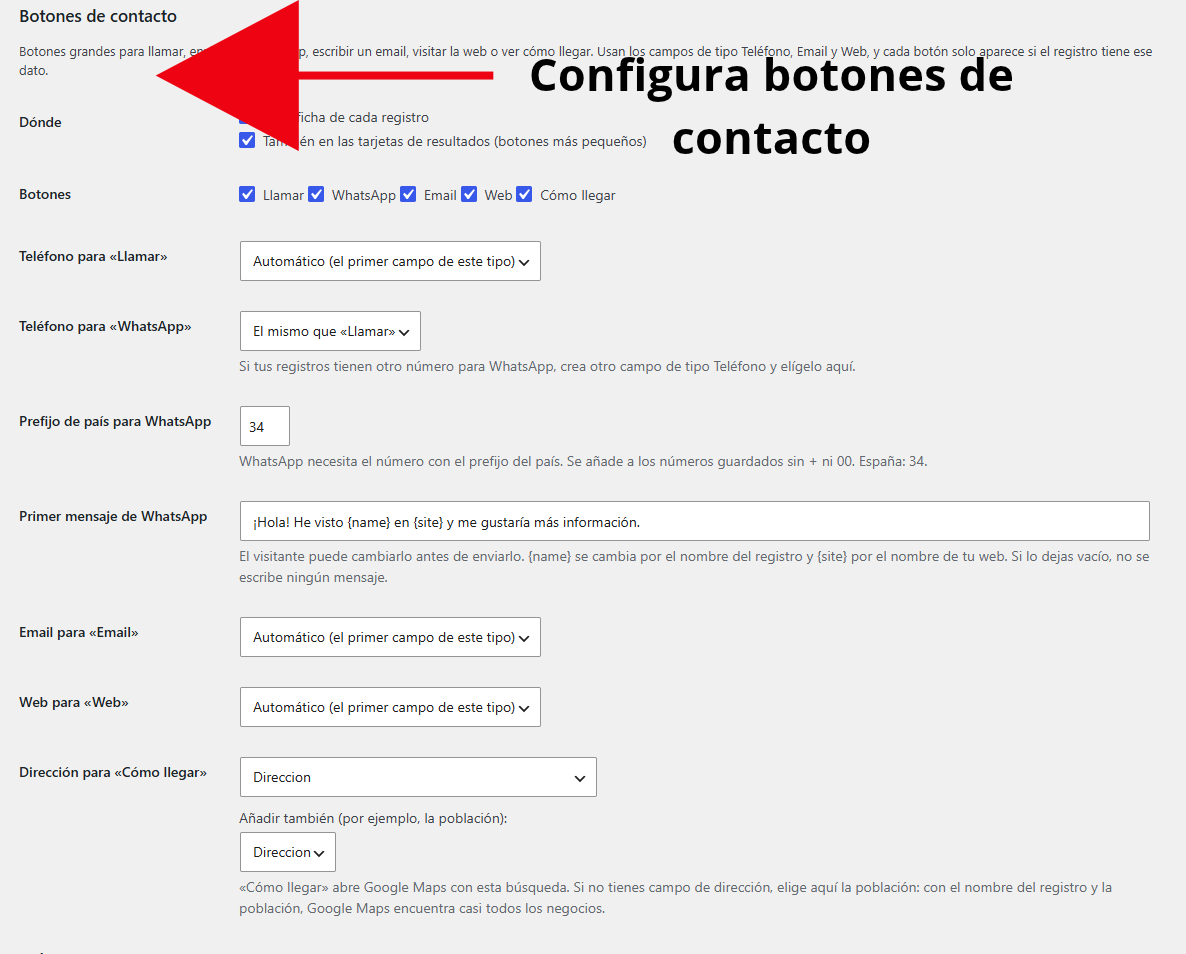
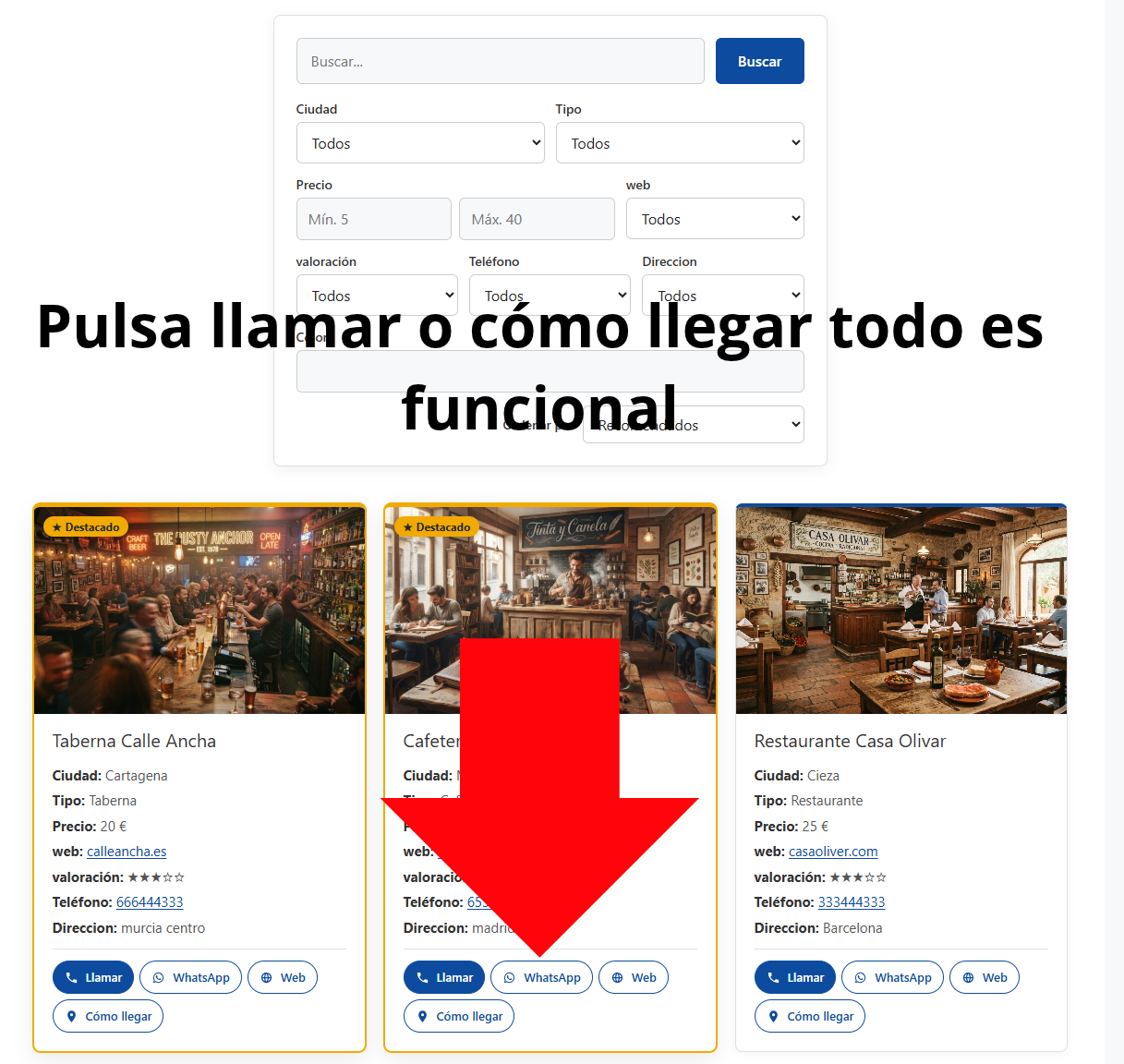
- They use your Phone, Email and Website fields, and each button only appears if the record has that information.
- WhatsApp opens with a first message you write, including the record’s name and your site’s name.
- “Directions” opens Google Maps with the address, or with the name and town if you don’t store addresses.
Record pages Google understands
Every record page carries the data Google knows how to read: what it is, where it is, how to get in touch and how much it costs. You just choose what your records are and which fields to use.
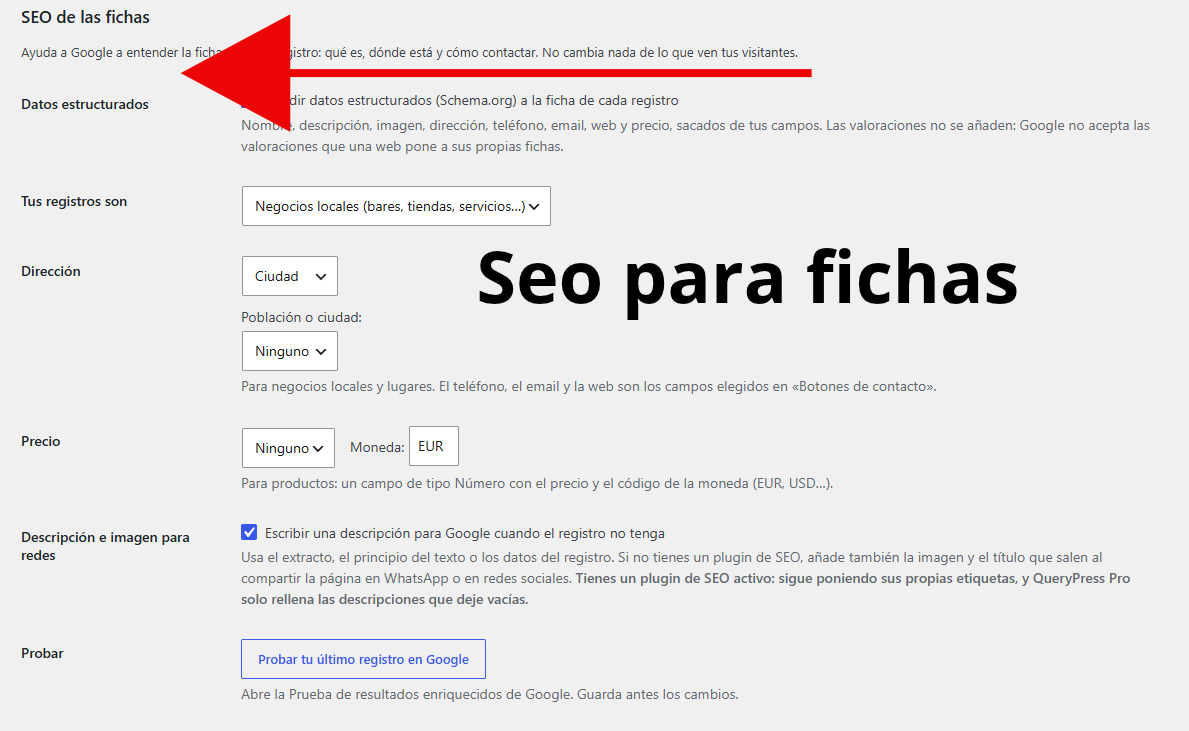

- Structured data (Schema.org) for local business, product or place: name, description, image, address, phone, email, website and price.
- An automatic description for Google when the record has none, built from its text or its data. Plus the image shown when shared on WhatsApp or social media.
- Works alongside Rank Math, Yoast SEO, All in One SEO and SEOPress: they keep doing their job and QueryPress Pro only fills in what is missing.
- No tricks Google penalizes: it doesn’t add made-up ratings to your own pages.
Upload hundreds of records at once
Fill in a sheet in Excel, Google Sheets or LibreOffice, upload it and QueryPress creates or updates all your records. Ideal for catalogs, real estate and large directories.
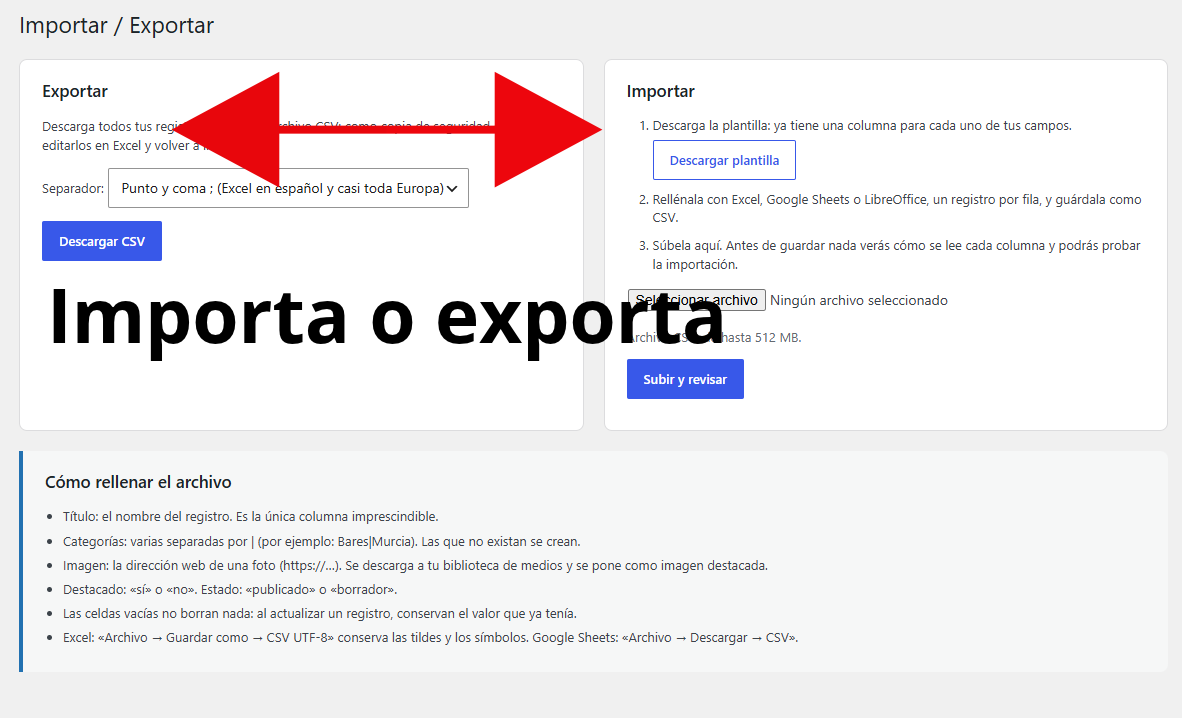
- Recognizes columns by their name (“Price”, “City”…) and lets you review them before importing.
- A test run that saves nothing tells you how many records will be created, how many updated and which data is not valid.
- Creates any missing categories and downloads photos to your media library from their web address.
- Bulk updates: export, change prices in Excel and import again, without duplicating records.
- Export everything in one click, with accents and symbols intact, as a backup.
How it works
In under five minutes you have your search with its own design.
Install the free plugin first
QueryPress is the base: create your fields and records and add the search with [querypress]. It’s essential: Pro doesn’t work without it. Download it here.
Buy and activate Pro
You receive your license key and the plugin by email. Upload it in Plugins → Add New, activate it and paste the key.
Choose your design
In QueryPress → Design you pick a palette, layout and shape while seeing the result live. Save and you’re done.
Free or Pro: what each one includes
Pro takes nothing away from the free plugin: it adds on top, which is why it needs it installed.
| Feature | Free | Pro |
|---|---|---|
| Custom fields, records, categories and a page for each record | ✓ | ✓ |
| Live search, filters and price ranges | ✓ | ✓ |
| Fast search index for large catalogs | ✓ | ✓ |
| Your own colors and preset palettes | — | ✓ |
| Dark mode | — | ✓ |
| 4 result layouts, and one per search | — | ✓ |
| Corners and spacing between results your way | — | ✓ |
| Featured records: shown first, with label and color | — | ✓ |
| “Sort by” menu: price, rating, name or newest | — | ✓ |
| Contact buttons: Call, WhatsApp, Email, Website and Directions | — | ✓ |
| Record pages ready for Google: structured data and automatic description | — | ✓ |
| Import from Excel or CSV and export all records | — | ✓ |
| Phone, Email, Website, Yes / No and Rating fields | — | ✓ |
| Clickable phone, email and website, and stars in the filters | — | ✓ |
| Live preview and custom CSS | — | ✓ |
| Automatic updates and email support | Forum | ✓ |
Clear pricing, no surprises
An annual license with every Pro feature, updates and support. Only the number of sites changes. Prices exclude VAT.
Before you buy: QueryPress Pro is an add-on and needs the free QueryPress plugin installed and activated. If you don’t have it yet, download it for free here.
1 site
For your own project
€39 + VAT / year
- Every Pro feature
- Updates for 1 year
- Email support
5 sites
For several projects or clients
€79 + VAT / year
- Every Pro feature
- Updates for 1 year
- Email support
Unlimited sites
For agencies and professionals
€149 + VAT / year
- Every Pro feature
- Updates for 1 year
- Email support
Prices exclude VAT: any VAT or sales tax that applies in your country is added on the checkout page before you confirm. If you buy as a business from another EU country with a valid VAT number, you can enter it at checkout. Secure payment by card or PayPal through Freemius, our official reseller, which issues your invoice. The license renews every year and you can cancel the renewal at any time. Purchase and refund policy.
14-day satisfaction guarantee. If QueryPress Pro doesn’t work as described on this page, is missing something you expected, or you have a problem we can’t solve together, we will refund your money within 14 days of purchase.
Frequently asked questions
Can I use QueryPress Pro without the free plugin?
No. The free plugin is essential: QueryPress Pro is an add-on built on QueryPress, which is where you create your fields and records and where the search lives. If you install only Pro, it won’t work: it will tell you the free plugin is missing and won’t activate, so there is no risk of breaking anything.
First download the free plugin, install and activate it, and then install Pro. Here is the step-by-step installation guide.
How do I download and install QueryPress Pro after buying?
First make sure the free QueryPress plugin is installed and activated. Right after paying you receive an email with your license key and a link to download the plugin. In WordPress go to Plugins → Add New → Upload Plugin, upload the .zip file and activate it. It will ask for your key: paste it and you’re done. If you lose the email, you can download the plugin again and see your key in your Freemius customer area.
What happens if I don’t renew my license?
Your site keeps working exactly the same, with your Pro design. You just stop receiving new updates and support. You can renew later whenever you want.
How do I cancel automatic renewal?
From the link in your purchase emails or from your Freemius customer area, at any time and without giving a reason. You can also write to us at contacto@querypress.es and we’ll do it for you. We will email you before each renewal.
Can I upgrade from 1 site to 5 sites, or to unlimited?
Yes. When you change license you only pay the prorated difference for the time left in your year.
Will it work with my theme?
QueryPress Pro doesn’t change the structure of the search: it uses the same responsive design as the free plugin and only applies your colors, shapes and layouts. It is designed to work with any well-built WordPress theme. If something doesn’t look right on your site, write to us and we’ll look into it; and remember you have a 14-day guarantee.
Will I lose my design if I update or reinstall the plugin?
No. Your colors and layout are saved in your WordPress and kept when you update. They would only be deleted if you deliberately tick the “Delete design settings when deleting the plugin” option. Pro never touches your records or fields.
Can I use a different design on each page?
Yes. In QueryPress → Design you choose the general design, and on any search you can change the layout by adding layout to the shortcode, for example [querypress layout="rows"]. The possible values are cards, list, compact and rows.
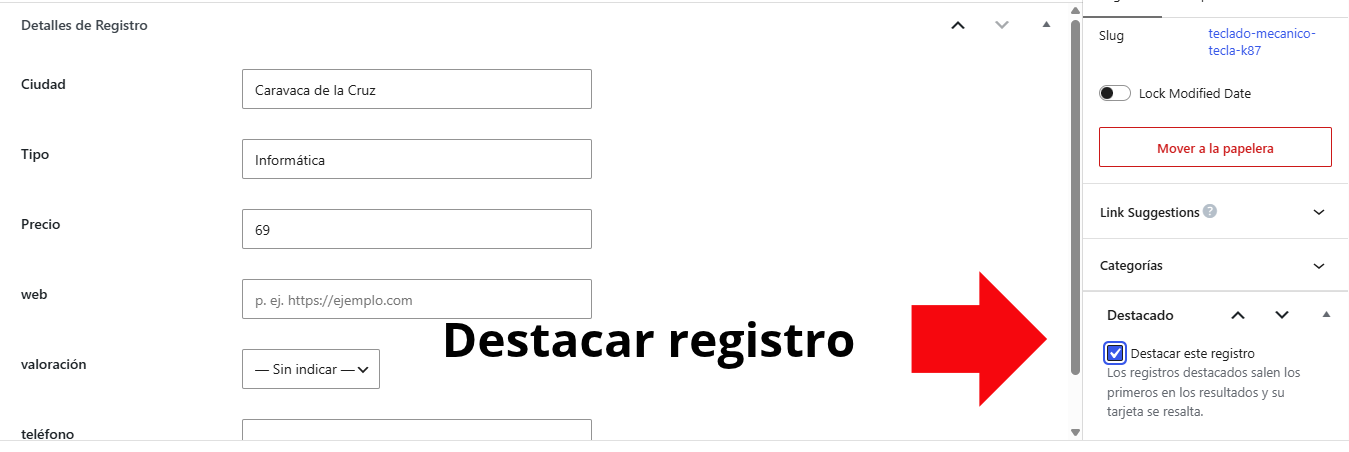
How do I feature a record?
Open the record in the editor and tick “Feature this record” in the “Featured” box on the right. Once you update it, it appears first in the search, with its label. The label text (“Featured”, “Recommended”, “Sponsored”…) and the color are changed in QueryPress → Design, under “Featured records”. In the records list you’ll see a star ★ next to the featured ones.
How do I turn on the “Sort by” menu?
Go to QueryPress → Design, “Sort results” section, tick the option to show the “Sort by” menu in the search and choose which options you want to offer. To sort by a field, such as price or rating, that field must be a Number or Rating field and be marked as Filterable in QueryPress → Fields. If you don’t want it on a specific search, add sort="no" to the shortcode.
How do I turn on the contact buttons?
Go to QueryPress → Design, “Contact buttons” section, choose where they appear (on each record page and, if you want, on the cards) and pick the buttons. They use Phone, Email and Website fields, so create those field types in QueryPress → Fields. For “Directions”, choose your address field or, if you don’t have one, the town: Google Maps will search for the record’s name in that town.
Does QueryPress Pro improve the SEO of my record pages?
It gets every record page ready for Google to understand: it adds structured data for local business, product or place (address, phone, price…) and a description when the record has none. You turn it on in QueryPress → Design, “SEO of the records” section, and it works alongside Rank Math, Yoast, All in One SEO or SEOPress. No plugin can promise Google rankings, which also depend on your content, but this way your record pages start with everything they need.
Can I upload many records at once from Excel?
Yes. In QueryPress → Import / Export you download a template with your fields, fill it in with Excel, Google Sheets or LibreOffice and upload it saved as CSV. Before importing you see how each column is read and run a test that saves nothing. Then it imports in batches, with a progress bar, even with thousands of rows. If a record already exists, you can update it, skip it or create a new one.
Will I get an invoice?
Yes. The purchase is handled by Freemius, our official reseller, which emails you a receipt with the taxes that apply in your country. If you need to include your company details, you can enter them at checkout.
What if I have a problem or a question?
Write to us at contacto@querypress.es. Your license includes email support, and we reply personally, in English or Spanish.
Give your search the design it deserves
Colors, layouts, featured records, sorting, contact buttons, record pages ready for Google, Excel import and new fields in minutes, with a 14-day guarantee.
Remember: you need the free QueryPress plugin installed and activated.